The gallery of submissions for week one of the Winter Photo Challenge (Light(s)) is now online here. Here’s an example by Dennis Lazowski:

Fore details about the challenge go here.

The next Camera Club meeting with be held on Friday, January 5th at 9:15 .am.
Our meeting will include:
Your images for the assignment must be emailed by noon on Friday, December 29th to be included in the slide show. For details on how to submit photos including formats and titles go to our Galleries page.
Ron Pierce has organized a Winter Photo Challenge which runs from January 1st to February 23rd.
The next assignment is Just the Three of Us and pictures from this assignment will be shown at the February 2nd meeting.
See you at the meeting.
If you’re interested in buying or upgrading Adobe Photoshop Elements for image editing or Adobe Premiere Elements for video editing then this sale is for you. Until January 7th you can get either program for $69.99US (regular price $99.99US) or a package of both programs for $99.99US (regular price $149.99US).
If you’re not sure you can download the full featured 30 day free trial of Photoshop Elements or the free trial of Premiere Elements and try it out for 30 days. Note that you do have to create a free Adobe account to download either program.
The Kanata Seniors Council Tech Tutors offers one-on-one tutoring on Photoshop Elements for $20 for 3 hours or $8 for one hour.
Ric Burns’ brilliant documentary Ansel Adams — A Documentary Film was created for the Sierra Club and PBS in 2002. You can watch it by clicking here.
You can see lots of his images on his website and read more about him on this wikipedia page.
A questionnaire has been created to provide feedback from Kanata Seniors Centre Camera Club members which will help determine content for future meetings and workshops.
This questionnaire was available at the meeting on January 5th. Copies are also available here, and at the Kanata Seniors Centre front desk.
Completed questionnaires can be dropped off at the Kanata Seniors Centre before January 15th or at the meeting on January 5th.
Thank you for your participation.
Your Camera Club Executive
Stormy Weather was the recent monthly photo topic. Amy Lo had taken this picture:
but it didn’t match with the topic so she added rain using Photoshop Elements version 11 and got this picture:
which she submitted. You can click on the above thumbnails to see larger versions of both images. If you want to see the intermediate steps, you can download Amy’s Photoshop Elements .psd file by clicking here then clicking on the blue Download button.
Amy used the technique shown in this video tutorial which she summarized as follows:
Thank you Amy for sharing.
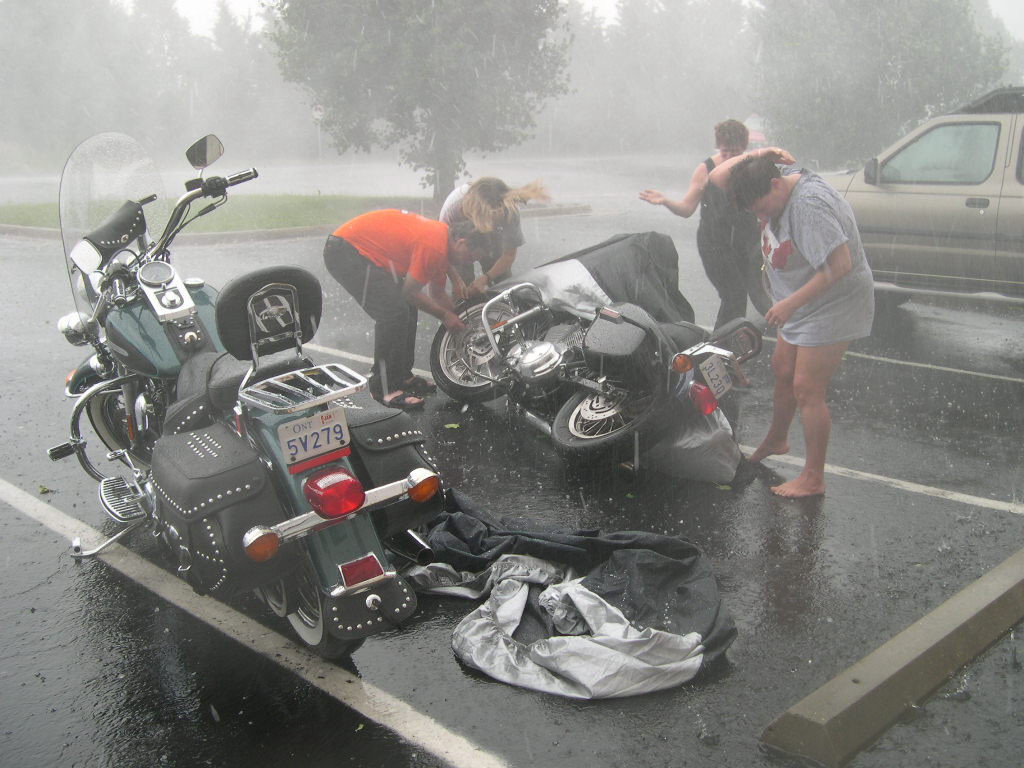
Photos submitted by members on the theme Stormy Weather can now be seen here.
Here are some videos with tips on getting your camera out of full Auto Mode presented at the December 1st meeting:
Phil Tughan

Are you looking forward to getting outside this winter and taking some outdoor photos in the blowing snow, freezing temperatures and dim light? No? Then, maybe you would rather take some indoor photos where it is warm and cozy and your fingers and toes are not frozen.
Does the lack of light in the winter months leave you uninspired and lacking motivation? If so, why not join us in our Winter Photo Challenge.
This 8-week Challenge is open to all KSCCC Members of all skill levels. Any type of camera and any type of post-processing technique can be used.
Topics (see new Challenge page on our website or table below) can be photographed either indoors or outdoors. Each topic addresses a unique subject. Each topic may inspire you to take a photograph in a different way using different techniques. The goal of the Challenge is to try something new that may inspire you.
All you need to do is photograph one topic each week and send your one photo to us by the due date. For example, if you take a photo during the week starting January 6th, the only requirement is that the topic be “Food” and the photo be submitted by noon on January 12th (see table).
If you can’t take a photo in a particular week, then take a photo in a week that you can. Again, the only requirement is that you take a photo that addresses the topic for that particular week and send it in by the due date.
Submit photos in the regular way using our Club’s e-mail address, with the words:
in the subject line (where # is replaced with the appropriate week number) and naming the file with the week number and the your name for example:
During the Challenge period, all submitted photos will be posted in special galleries linked from the Challenge page on our website. At the end of the Challenge, photos will be compiled into a video that will be shown at our March meeting.
Photo challenges are a great way to look at new subjects in unique ways and to try different techniques. Inspiration can often be found in the most mundane subject.
If you have any questions, please contact me by email.
Ron Pierce
| WEEK | START DATE | TOPIC | DUE DATE |
| 1 | Monday, Jan 1 | Light(s) | Friday, Jan 5 |
| 2 | Saturday, Jan 6 | Food | Friday, Jan 12 |
| 3 | Saturday, Jan 13 | Reflections | Friday, Jan 19 |
| 4 | Saturday, Jan 20 | Frozen | Friday, Jan 26 |
| 5 | Saturday, Jan 27 | Still Life | Friday, Feb 2 |
| 6 | Saturday, Feb 3 | After Dark | Friday, Feb 9 |
| 7 | Saturday, Feb 10 | Red | Friday, Feb 16 |
| 8 | Saturday, Feb 17 | Circles or Curves | Friday, Feb 23 |
 Kanata Seniors' Centre Camera Club