
You can review the slides from Manfred’s interesting post on image formats here.

You can review the slides from Manfred’s interesting post on image formats here.
The 13 educational videos from Dirk Ercken can be found here.
The video of Amy and Debbie’s attempts at painterly flowers can be found here.
The Amazon link for the Portable Collapsible Stool ($29.99 – gone up in price, there are others you can search on, or see at the bottom of the page) can be found here.

We talk about once-in-a-lifetime photos and often go to places we may never see again.
Then why are we not treating these opportunities as unique and rare, ensuring we fully capitalize on the experience and come back with stunning images and of course amazing memories of our travels.
Using our trip through Nevada, Las Vegas, Death Valley, and Lake Tahoe as an example, this session will look at the Before, During, and After elements of your travel photography.
We start with travel planning, selecting side trips, and formulating an itinerary, plus what to pack. We of course discuss some photo techniques aimed at maximizing image quality and variety, while keeping intact the elements of a “Fun Vacation” for all the members of your travel party. Then, we wrap up with some brief notes on strategies that enhance the visual impact of each image, bringing back the feelings and emotions of being there.
In his presentation, we’ll see some of his thinking processes and techniques as he takes us through the amazing country side of the Nevada desert, Death Valley and Lake Tahoe.
About Mike
Mike joined his 1st camera club over 40 years ago and was immediately encouraged when he started winning photographic awards in local and CAPA competitions. One of the guest speakers at that camera club was a pro who outlined the realities of running a photography business. This really resonated with Mike who had started down the road to weddings, portraits, and events. He then re-focused on photography but just as an avid hobby and artistic pursuit.
A born mentor and teacher Mike instead focuses on sharing his passion and experience with others. He supports several local camera clubs in various capacities and also runs a huge Ottawa-based photo interest group that has grown to over 2900 members under his leadership. He hosts a wide range of photographic opportunities for local photographers of all skill levels.
You can see more of Mike’s work here.
Wednesday December 4, 2024 – Small Flash Workshop
Maximum number of attendees – 8 with 2 instructors (Ross and Manfred)
Attendees must own a small external flash (speedlight) that is compatible with their camera make and model and must know how to use it in TTL and manual mode. Flash must have a head that rotates at least 180 degrees.
This workshop is primarily aimed at intermediate photographers would want to improve their flash photography. We will cover issues with direct flash (camera mounted flash aimed at the subject), bounce lighting and basic off camera flash.
We will be working in groups of two, with one person being the subject and the other the shooter. Everyone will get a chance to shoot and be the model.
Signup: November meeting
Wednesday January 29, 2025 – 10 Basic Editing Tools in Post-processing
Maximum number of attendees – 30 with one instructor (Ross)
Ross will demonstrate 10 basic editing techniques that can be used by any photographer to enhance the images that come out of your camera. While Ross will be using Adobe software to demonstrate these techniques, the functions are available in virtually all other photo editing software.
Signup: January meeting
Thursday, March 27, 2025 – Uncovering and Refining your “Diamonds in the Rough” Images
Maximum number of attendees – 30 with one instructor (Manfred)
Demonstrate how to identify a strong image that just needs to be refined in post-processing. Attendees will be asked to submit one of their images (ideally in RAW format) to Manfred.
Some of these images will be analyzed and edited during the session to show the attendees their work can be enhanced in post.
Signup: March meeting
NOTE: The times of these workshops will be announced at a later date. The dates are firm.`
When submitting photos to the club for the monthly challenge, it is important to use the correct resolution. The optimum resolution given the club’s current projection facilities and most of our monitors is 1920×1080.
If you are submitting one or more photos using a MacBook or Apple desktop using the Mac operating system and the Apple email app, it is important to make sure that you are mailing the image(s) at their actual size.
This is a sample email of a photo being submitted. Note that the “Image Size” is set to “Actual Size”.
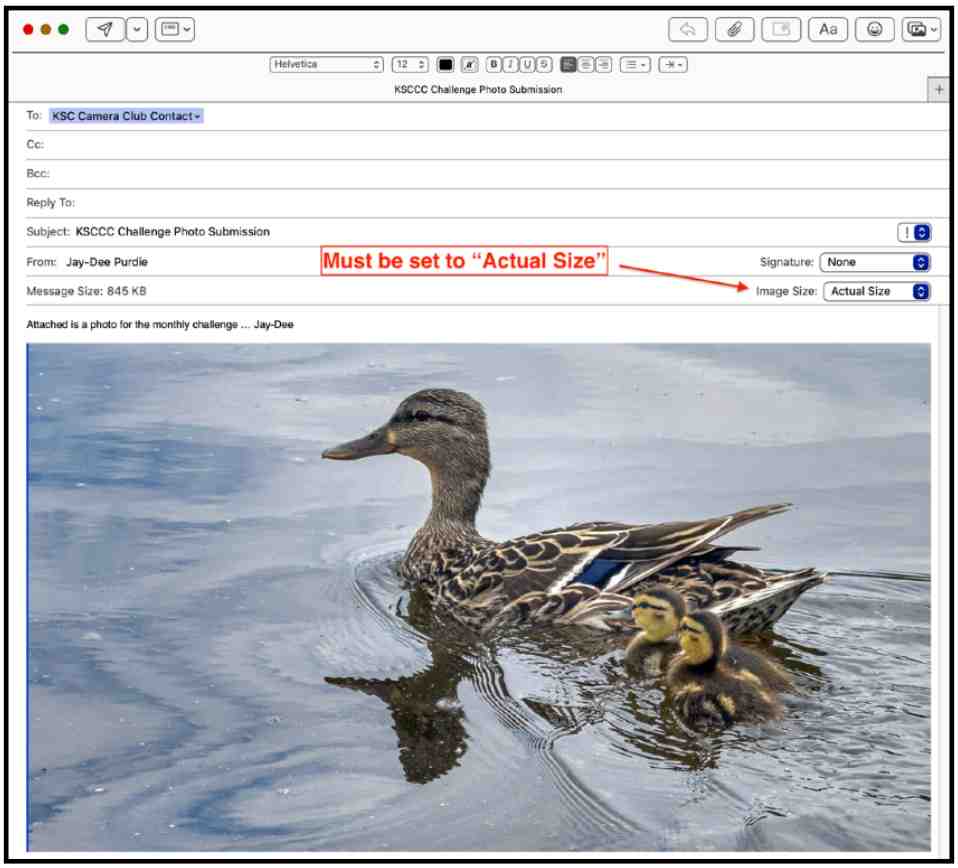
Other size options are:
but these are not needed to submit an image to KSCCC.
Another important thing to note is that the Apple Email app will remember the Image Size that was used for a previous email. So, try and remember to always check this email option when sending photos.
Jay-Dee Purdie

You can review Manfred’s excellent presentation on what makes a strong image here.

If you missed Stephen Stephen’s excellent presentation on the mammals of Etosha National Park or you just want to look at some of his great images again, click here.
For more information about Nature’s Tapestry Photo Adventure Tours, click here.

The slides from Lynda Buske’s excellent presentation on how to take better travel photos are here. She gave us so many excellent tips that you may want to review them later.
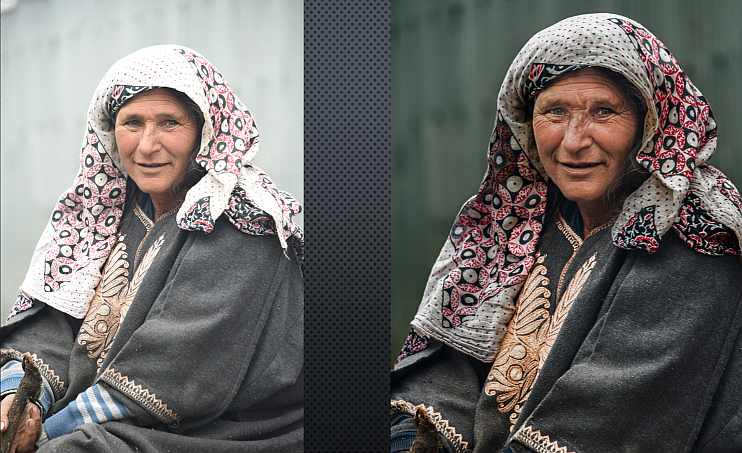
The slides from Manfred’s update on Fix My Pic are available here.
 Kanata Seniors' Centre Camera Club